Creating a 3D animated project—whether it is a short film, a commercial, or an episodic children’s series—is a monumental task that requires absolute visual consistency. Before a single polygon is modeled in Blender or a single prompt is fed into an AI image generator, you must have a definitive blueprint for your cast. This blueprint is known as a character sheet (or model sheet).
A well-crafted character sheet serves as the ultimate reference document for 3D artists, riggers, animators, and even AI generative models. It ensures that no matter who is working on the character, or what scene they are placed in, their proportions, clothing colors, and facial structures remain perfectly consistent. Without it, your protagonist might look completely different from one camera angle to the next, destroying the illusion of your animated world.
In this comprehensive guide, we will explore exactly how to plan, structure, and create a professional-grade character sheet tailored specifically for 3D animation pipelines.
What is a 3D Animation Character Sheet?
A character sheet is a static visual document that displays a character from multiple specific angles, accompanied by color palettes, texture references, and proportion guides. In traditional 2D animation, character sheets help animators draw the character consistently. In 3D animation, they are used as background reference images (image planes) inside software like Maya, ZBrush, or Blender. The 3D modeler traces over these orthographic drawings to sculpt the digital mesh.
For those utilizing AI to generate 3D animated scenes, a character sheet is equally vital. It acts as the anchor image for training LoRAs (Low-Rank Adaptations) or using image-to-image prompting, ensuring the AI understands exactly what your character looks like from every conceivable angle.
Essential Elements of a 3D Character Sheet
To be effective, your character sheet must be completely devoid of dramatic perspective, heavy shadows, or dynamic poses. It is a technical document, not a promotional poster. Here are the mandatory components:
1. Orthographic Projections (The Turnaround)
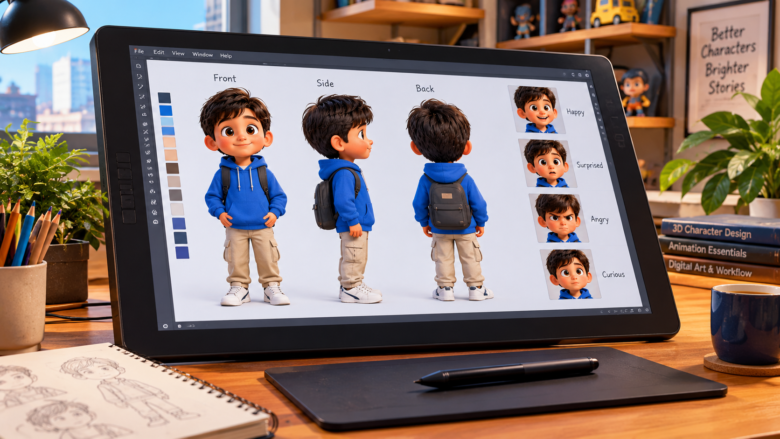
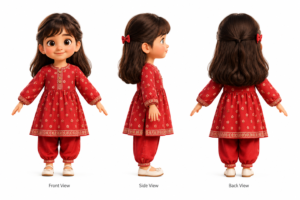
The core of any 3D character sheet is the turnaround. This involves drawing or generating the character perfectly straight-on from multiple angles, without any perspective distortion (hence, “orthographic”).
- Front View: Essential for modeling the width of the character and the symmetrical details of the face and clothing.
- Side View (Profile): Crucial for establishing the depth of the character, the shape of the nose, the curvature of the spine, and the volume of the hair.
- Back View: Often neglected by beginners, but strictly necessary for modeling the back of garments, hairstyles, and accessories like backpacks.
2. The T-Pose or A-Pose
Characters in a 3D reference sheet must be posed in a way that makes them easy to model and rig (add a digital skeleton).
- The T-Pose: The character stands straight with arms extended perfectly horizontal. This is great for mechanical models.
- The A-Pose: The character stands with arms resting at a 45-degree angle. This is generally preferred for organic characters and 3D clothing, as it causes less stretching in the shoulder topology during the rigging phase.
3. Precise Proportions and Scale
Maintaining accurate physical proportions is a major hurdle in animation. Whether you are designing a tall, athletic hero or ensuring a character has a normal, slim build rather than an overly thick or distorted frame, the character sheet must map out these physical dimensions. Professional sheets often include horizontal grid lines indicating the height of the character in “heads” (e.g., a cartoon character might be exactly 4 heads tall).
4. Defined Clothing Colors and Textures
Leaving clothing colors ambiguous leads to disastrous continuity errors across multiple scenes. Your character sheet must feature a dedicated color palette (usually small circles or squares on the side of the page) indicating the exact hex codes for skin, hair, eyes, and every article of clothing. Explicitly defining clothing colors guarantees that when your characters are placed in different lighting environments—like a moody indoor room or a bright outdoor market—their core colors remain identifiable.
Step-by-Step Guide to Creating Your Character Sheet
If you are developing a children’s animated series featuring a diverse ensemble cast—such as Ahmed, Fatima, Gappu, Soni, Dori, Mithu, Doru, Niko, and Mika—each individual requires their own dedicated reference sheet. Attempting to model them without one will inevitably result in characters that look like they belong in completely different universes.
Step 1: Conceptualization and Rough Sketching
Before committing to the rigid orthographic views, explore the character’s personality. Sketch them in dynamic poses. Determine if they are energetic, shy, clumsy, or heroic. These initial sketches will inform their posture, clothing choices, and hairstyle. Once you have a concept you love, you can begin translating it into the rigid technical sheet.
Step 2: Establish the Grid
Open your digital art software (like Photoshop, Procreate, or Clip Studio Paint) and lay down horizontal guidelines. At a minimum, place lines for the top of the head, the eyes, the chin, the shoulders, the waist, the knees, and the feet. These lines ensure that as you draw or generate the side and back views, all the features line up perfectly with the front view.
Step 3: Draw the Front and Side Views
Start with the front view, keeping the character perfectly symmetrical if possible. Once complete, project the horizontal grid lines across the canvas and draw the side profile. Crucial tip: Ensure the volume of the character matches exactly. If the character’s arm is a certain thickness in the front view, it must be mathematically consistent in the side view.
Step 4: Detail Callouts and Expressions
A single static pose does not convey a character’s emotional range. In the empty corners of your character sheet, include “callouts.”
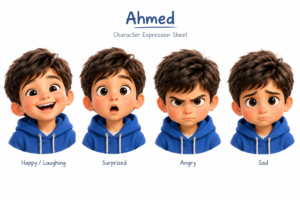
- Expression Sheet: Draw the character’s face showing joy, sadness, anger, and surprise. This helps 3D modelers understand how the facial topology needs to move.
- Accessory Details: If your character wears a specific necklace, carries a unique tool, or has intricate patterns on their shoes, draw a zoomed-in, highly detailed version of that specific item.
Leveraging AI to Generate Character Sheets
If you are not a traditional 2D illustrator, AI image generators can drastically speed up the character sheet creation process. However, because AI struggles with consistency, you must use highly specific prompt formulas to force it into creating an orthographic layout.
The AI Prompting Formula for Turnarounds
To get a usable character sheet from tools like Midjourney or DALL-E 3, use a prompt structure similar to this:
“A multiple-view character design sheet of a 3D animated boy, featuring a front view, side profile view, and back view. He is wearing a blue shirt and brown pants. Normal slim build, clear proportions. White background, flat lighting, Pixar style, highly detailed orthographic turnaround, concept art blueprint.”
Refining AI Outputs
AI will rarely give you a mathematically perfect turnaround on the first try. You will likely encounter slight inconsistencies—perhaps the shoes are a different color in the side view, or an unwanted duplicate element appears on the character’s back. When this happens, bring the generated sheet into an editing program like Photoshop. Use the front view as your “source of truth,” and manually edit or paint over the side and back views to correct clothing colors, remove extra limbs, and ensure the grid lines match up perfectly.
Common Mistakes to Avoid
- Using Dramatic Lighting: Never use cinematic or moody lighting on a character sheet. Harsh shadows hide the very details the 3D modeler needs to see. Always opt for “flat,” “even,” or “high-key” lighting.
- Dynamic Posing: If a character’s spine is twisted or their arms are crossed, the 3D modeler cannot accurately gauge the symmetry or length of their limbs. Always stick to the T-pose or A-pose.
- Cluttered Canvas: Do not cram too many characters onto one sheet. Give every character the space they deserve. A cluttered sheet leads to confusion and misinterpretation during the modeling phase.
Conclusion
Creating a character sheet is the most critical preparatory step in 3D animation. It is the visual contract that ensures your characters remain true to their design from the first frame to the last. By carefully plotting out orthographic views, defining exact proportions, locking in clothing colors, and mapping out facial expressions, you provide an infallible guide for the rest of the production pipeline. Whether you are painstakingly modeling characters by hand or utilizing advanced AI workflows to generate your scenes, a precise, well-structured character sheet is the foundation upon which great animated storytelling is built.
Frequently Asked Questions
Q1: What is the difference between a T-pose and an A-pose?
A T-pose has the character’s arms straight out horizontally parallel to the floor. An A-pose has the arms resting downwards at roughly a 45-degree angle. A-poses are generally preferred by modern riggers as they result in more natural shoulder deformations when the character drops their arms to their sides.
Q2: Do I need a character sheet if I am only using AI to generate my final video?
Yes. To keep a character consistent across multiple AI-generated scenes (like a garden in one scene and a market in the next), you need a reference image to feed back into the AI via image prompting or to train a custom character model. The character sheet serves as this perfect reference.
Q3: How many views are absolutely necessary?
At the bare minimum, you need a front view and a side profile view to model a character in 3D. However, a back view is highly recommended to ensure the rear of the clothing and hair are accurately represented.
Q4: Should I include lighting information on the character sheet?
No. The character sheet should be lit as flatly and evenly as possible so that the true base colors (albedo) of the character’s skin and clothing are visible. Lighting design should be reserved for your storyboards and environment concept art.
Q5: Can I put multiple characters on one sheet?
It is generally discouraged unless you are creating a “lineup sheet,” which is used solely to compare the heights and scale of different characters side-by-side. For modeling and detailing, each character should have their own dedicated sheet.
Sources & References
- The Animator’s Survival Kit by Richard Williams – Core principles of character design, consistency, and animation blueprints.
- Blender Studio Production Guidelines – Industry standards for character modeling reference sheets, orthographic setups, and A-pose rigging preparation.
- 3D Total Publishing: Beginner’s Guide to Character Creation – Techniques for translating 2D conceptual sketches into functional orthographic turnarounds for digital sculpting.