Creating breathtaking 3D scenes using AI image generators requires much more than just describing a character and a background. To truly elevate your AI-generated art from flat, generic renders to cinematic masterpieces, you must step into the role of a virtual cinematographer. The difference between an amateur generation and a professional 3D animated sequence lies entirely in how you direct the camera and shape the light.
When generating multi-scene 3D animation projects—especially those featuring recurring characters across different environments—mastering camera angles and lighting prompts ensures visual continuity, emotional depth, and striking realism. By feeding the AI specific photographic and rendering terminology, you take absolute control over the composition, ensuring your 3D worlds are beautifully lit and dynamically framed.
The Foundation of AI Camera Control
AI image models like Midjourney, DALL-E 3, and Stable Diffusion process spatial relationships based on standard photography terminology. If you omit a camera angle from your prompt, the AI will almost always default to an eye-level, medium-wide shot. While this is fine for basic character design, it becomes incredibly repetitive when storyboarding a complex project.
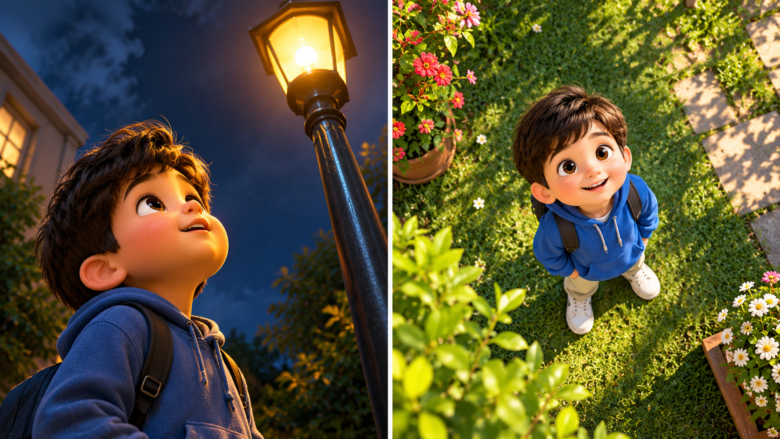
To break away from the default view, you must explicitly tell the AI where the virtual camera is positioned relative to your subject. The camera angle dictates the audience’s psychological reaction to the scene. A character viewed from below appears powerful and imposing, while a character viewed from above appears vulnerable or small within a massive environment.
Essential Camera Angle Prompts for 3D Storytelling
To build a captivating 3D narrative, you need a diverse shot list. Here are the most effective camera angle keywords to use in your prompts, categorized by their storytelling purpose.
1. The Establishing Shot (Wide and Extreme Wide)
Establishing shots are crucial when introducing a new environment, such as a bustling outdoor food market or a sprawling garden. They provide the audience with spatial awareness and set the scale of the world.
- Keywords: Extreme wide shot, establishing shot, panoramic view, wide-angle lens (e.g., 14mm lens), deep depth of field.
- Prompt Example: An extreme wide establishing shot of a vibrant 3D animated food market. In the distance, a boy named Ahmed and a girl named Fatima are walking past colorful fruit stalls. Wide-angle lens, expansive environment, clear focus on the background architecture, Pixar style, 8k.
2. The Medium Shot (The Workhorse)
The medium shot frames characters from the waist up. It is the most common angle for dialogue scenes and general interactions, allowing you to clearly see character clothing colors and facial expressions while still retaining some environmental context.
- Keywords: Medium shot, mid-shot, waist-up framing, eye-level angle, 50mm lens.
- Prompt Example: A medium shot of a 3D animated character named Gappu wearing a bright yellow shirt, standing in a sunlit garden. Waist-up framing, 50mm lens, soft background blur, highly detailed facial features, Unreal Engine render.
3. The Close-Up and Macro Shots
Close-ups are used to convey intense emotion, highlight a specific action, or show intricate details like the texture of a character’s skin or the fabric of their clothing.
- Keywords: Extreme close-up, macro photography, tight framing, 85mm portrait lens, shallow depth of field, sharp focus on eyes.
- Prompt Example: An extreme close-up of a 3D animated girl named Dori. Tight framing on her face, showcasing a surprised expression. Macro detail on her skin texture and eye reflections, 85mm lens, blurred background, cinematic lighting.
4. High Angle and Low Angle
Changing the vertical tilt of the camera dramatically alters the mood.
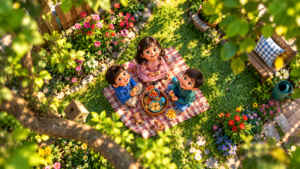
- High Angle / Bird’s-Eye View: Looks down on the subject. Great for showing a character navigating a complex environment.
- Low Angle / Worm’s-Eye View: Looks up at the subject, making them appear heroic or towering.
- Keywords: High angle shot, bird’s-eye view, looking down from above. Low angle shot, worm’s-eye view, looking up, dramatic tilt.
Mastering 3D Lighting Prompts
Lighting is the lifeblood of 3D rendering. Without explicit lighting instructions, AI generators often output murky, underexposed images with muddy colors and duplicate elements blending into the shadows. To ensure your characters pop and your environments feel alive, you must construct a virtual lighting rig within your prompt.
1. Global and Ambient Lighting
For 3D styles like Pixar, Disney, or Dreamworks, you generally want bright, clean, and evenly distributed light. This ensures that character proportions are clear and that no unwanted dark shadows obscure the details.
- Keywords: Global illumination, high-key lighting, ambient occlusion, brightly lit, vibrant color palette, bounced light.
- Application: Use these terms when you want a clean, commercial-grade 3D look with vivid clothing colors and highly visible backgrounds.
2. Natural and Environmental Light
When your scenes take place outdoors, the sun is your primary light source. Specifying the time of day and the nature of the sunlight drastically changes the atmosphere.
- Keywords: Golden hour, bright midday sunlight, dappled sunlight through trees, volumetric lighting, god rays, soft morning light.
- Prompt Example: A medium shot of 3D animated characters Doru and Niko in a lush forest. Dappled sunlight filtering through the canopy, glowing volumetric god rays illuminating the characters, bright global illumination, rich green colors.
3. Studio and Dramatic Lighting
For indoor scenes or dramatic character portraits, you can borrow terminology from real-world photography studios. This allows you to sculpt the character’s face with light and separate them from the background.
- Three-Point Lighting: The standard setup for professional renders (Key light, Fill light, Backlight).
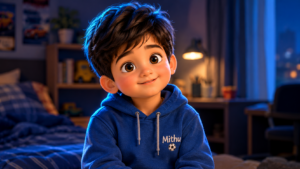
- Rim Lighting / Backlighting: Places a glowing outline around the character, perfectly separating them from dark backgrounds.
- Softbox Lighting: Provides smooth, flattering light that is excellent for fixing harsh shadows on 3D character faces.
- Keywords: Three-point lighting, strong rim light, softbox lighting, cinematic studio lighting, neon fill light, dramatic contrast.
Combining Angle and Light: The Ultimate Prompt Formula
To consistently generate perfectly framed and beautifully lit 3D images, combine the camera angle, the lighting setup, and the render engine into a structured formula.
The Formula: [Camera Angle] + [Subject Description & Action] + [Environment] + [Lighting Setup] + [Render Engine & Style]
Example in Action:Let’s say you are generating Scene 5 of an animation project featuring characters Mika and Soni in a food market.
- Weak Prompt: Mika and Soni at the market, 3d style. (Results in a flat, mid-shot, unpredictable lighting).
- Optimized Prompt: A low-angle establishing shot of 3D animated characters Mika and Soni standing in front of a towering fruit stall in a bustling outdoor food market. Bright midday sunlight, soft volumetric lighting hitting the colorful fruits, sharp rim light on the characters, high-key global illumination, Pixar style, Octane Render, Unreal Engine 5, 8k resolution, vivid colors.
By following this formula, the AI understands exactly where to place the camera (low angle), how to light the scene (midday sun, rim light, global illumination), and what quality to render it in (Octane, UE5).
Conclusion
Directing an AI to generate the perfect 3D scene is an exercise in precise communication. By mastering camera angle terminology, you can dictate the emotional weight and spatial dynamics of every shot, effortlessly transitioning from sweeping establishing shots to intimate extreme close-ups. Paired with a deep understanding of lighting prompts—from bright global illumination to dramatic rim lighting—you eliminate muddy shadows and ensure your characters are vibrant, clear, and perfectly separated from their backgrounds. Implement these techniques into your prompt engineering workflow, and your 3D AI artwork will rival the polish of professional animation studios.
Frequently Asked Questions
Q1: How do I stop the AI from blurring the background in wide shots?
AI often defaults to a shallow depth of field (blurry background). To keep everything sharp in an establishing shot, add the keywords: deep depth of field, f/16, infinite focus, sharp background, all elements in focus.
Q2: What is the best lighting prompt for colorful 3D cartoon characters?
For vibrant, clear 3D characters, use: high-key lighting, bright global illumination, softbox lighting on face, vibrant color grading. This eliminates heavy shadows and makes clothing colors pop.
Q3: Can I prompt for a specific camera lens?
Yes, AI models understand focal lengths. Use 14mm or 24mm for wide, distorted angles (great for vast environments). Use 50mm for natural, eye-level shots. Use 85mm or 100mm macro for tight, intimate close-ups.
Q4: How do I fix characters blending into dark backgrounds?
Use the keyword rim lighting or backlighting. This creates a thin halo of light around the edges of your 3D character, visually separating them from the background environment.
Q5: What keywords guarantee the highest quality 3D render?
Always append your prompts with professional 3D software and engine names. The most effective combinations include: Unreal Engine 5 render, Octane Render, Redshift, Pixar style, ray tracing, 8k resolution.
Sources & References
- Blender Foundation Documentation – Principles of 3D Camera Optics, Field of View, and Global Illumination.
- The American Society of Cinematographers (ASC) – Fundamentals of camera angles, three-point lighting, and visual storytelling in digital mediums.
- Midjourney & Stable Diffusion Prompt Manuals – Parameter guidelines for controlling latent space compositions, focal lengths, and volumetric light generation.